
Subtle processing for tracks and buses
EUBULUS
Refine the details. Keep your sound.
Subtle, coordinated tone and dynamics processing with one main control and clear feedback.
Vintage-inspired interface. Adaptive digital processing.
Launch price: USD 29
One-time license. No recurring subscription.
Launch preparation · VST3 · Windows x64 · macOS
The complete VST3, recorded
Hear the detail. Decide for yourself.
Three original instrumental passages processed by EUBULUS 1.0.1 for Windows. Switch between the original and processed take at the same playback position.
These are recordings of the actual plug-in output, not the reduced browser effect below. Playback starts only when you press Play.
Synthesized keys
Follow the body and attack of the notes. The source is original synthesis, not a recorded piano.
INTENSITY 65% · AUTO · 8 s · 48 kHz
Choose A or B, then press Play.
Original drum loop
Compare the balance of kick, snare and hats. This is synthesized percussion, with no sampled loops.
INTENSITY 65% · AUTO · 8 s · 48 kHz
Choose A or B, then press Play.
Short instrumental mix
Listen to the same keys, percussion and bass together. Keep the original when processing is not useful.
INTENSITY 55% · AUTO · 8 s · 48 kHz
Choose A or B, then press Play.
How these comparisons were made
The source material was synthesized specifically for these demonstrations: keys, percussion and an instrumental arrangement. There are no third-party recordings, sampled loops or recorded vocals.
Each take was rendered through the complete Windows VST3 1.0.1 at 48 kHz, in AUTO mode, using the intensity shown above. Original means latency-aligned bypass. Eight seconds were selected after eight seconds of warm-up; both takes have identical 10 ms edge fades.
Constant gain was applied after rendering to match integrated loudness. The largest measured difference in the exported files is 0.02 LU. This extra listening match is not a claim that automatic level compensation always achieves that accuracy. No tone, dynamics or stereo processing was added after the VST3.
A/B uses a short 5 ms player transition to avoid clicks. It is separate from the plug-in ENGAGE transition. These examples are not a blind preference study or a guarantee that every source will improve.
Listen for yourself
Your audio is the starting point.
Choose a clip or load your file. Press play, then compare the original and processed versions.
A reduced browser demo, not the complete VST3 plugin. No account or audio upload is required.
In your session
Small changes, in context.
Voices and instruments
Explore a subtle change of tone and dynamics on an individual track. Compare it in the arrangement, not only in solo.
Groups and buses
Try a restrained setting on a group or mix bus. Use bypass at a comparable level and keep the original when the processing does not help.
When to fix the source first
Clipping, arrangement masking and recording problems can need their own correction. EUBULUS is not a promise of universal restoration or automatic mastering.
Under the main control
The details, when you need them.
The plugin identifies a source profile and blends its processing chain. You can lock the profile manually in the plugin.
Measurement methodology ↗Windows 1.0.1 adds a live compensated-output meter, rotating knob wear and a faster ENGAGE comparison. The automatic source detection and steady processing are unchanged. The macOS update has not been released.
Formats and platform status
| Windows x64 · 1.0.1 | VST3 build qualified, including the installed artifact. Unsigned ZIP distribution. |
|---|---|
| macOS 1.0.0 · arm64 | Native Apple Silicon validation passed. |
| macOS 1.0.0 · x86_64 | Validation passed through Rosetta on Apple Silicon. Intel Mac hardware was not tested. |
| macOS signing | Ad-hoc signed, without Developer ID or notarization. Gatekeeper may show a warning or block the plugin. |
| DAW | No named DAW has been verified yet. A qualified build is not a host compatibility certification. |
Is the browser demo the full plugin?
No. It is a reduced version of the idea. It is not a DAW trial and does not reproduce the full plugin chain.
What do the knob, ENGAGE and meters do?
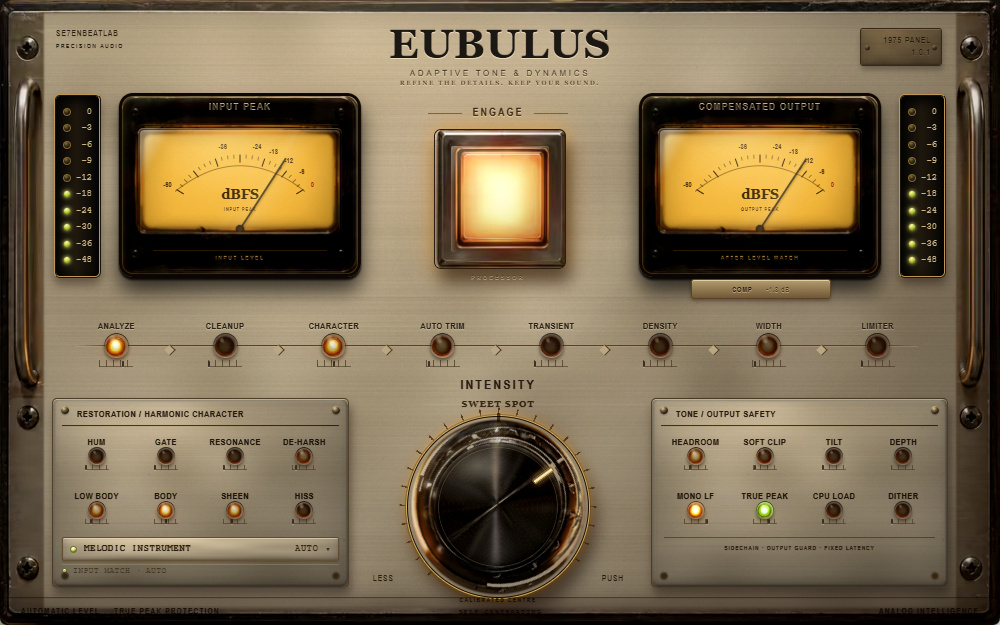
INTENSITY coordinates the processing dose; above its calibrated centre, PUSH increases internal drive while level compensation remains active. ENGAGE compares with latency-aligned bypass. In Windows 1.0.1 the right needle reads actual compensated output in dBFS; COMP separately reports applied gain, not output loudness.
Does it need se7en Engine, an account or online activation?
No separate se7en Engine installation or online activation is required. The planned distribution is a complete VST3 folder in a ZIP with a bilingual manual, not a subscription. Windows requires the Microsoft Visual C++ x64 and WebView2 runtimes described in the manual.
Is there a DAW trial, Audio Unit or standalone app?
No timed DAW trial is currently offered. EUBULUS is a VST3 effect, not a standalone application; Audio Units and AAX are not included. Check your host and operating system before choosing it. Logic Pro requires Audio Units and is not a compatible format for this VST3 package.
Launch price: USD 29
One-time license. No recurring subscription.
Launch preparation
Get the EUBULUS release notice
Public purchase and delivery are not open yet. No preorder or payment is taken here. Leave your email for the release notice.
By subscribing, you agree to receive release news. Privacy policy